ATTENTION!!! No registration is required in any of the payment aggregators listed below to make a payment. All payments are made through your personal account by selecting the amount (in $$) and the payment aggregator.
I repeat, you do NOT need to register on the payment aggregator's website!
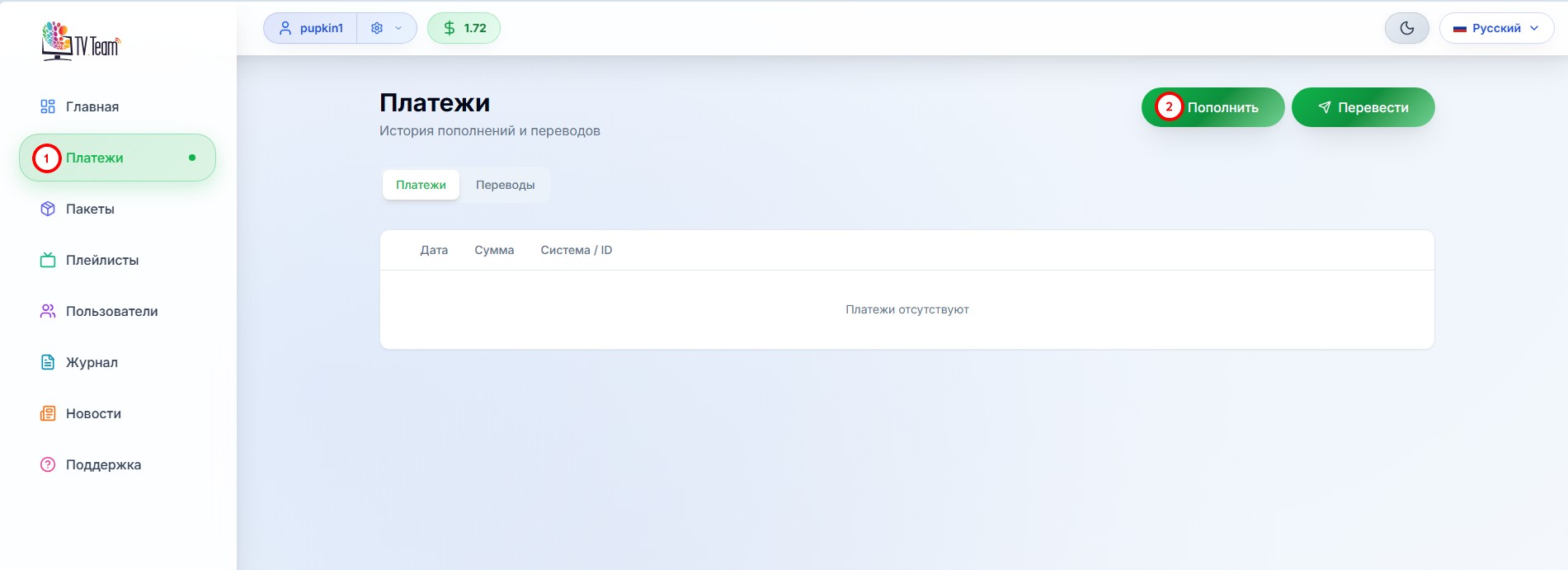
In your personal account, go to the Payments section (1) and click the Top up button (2).
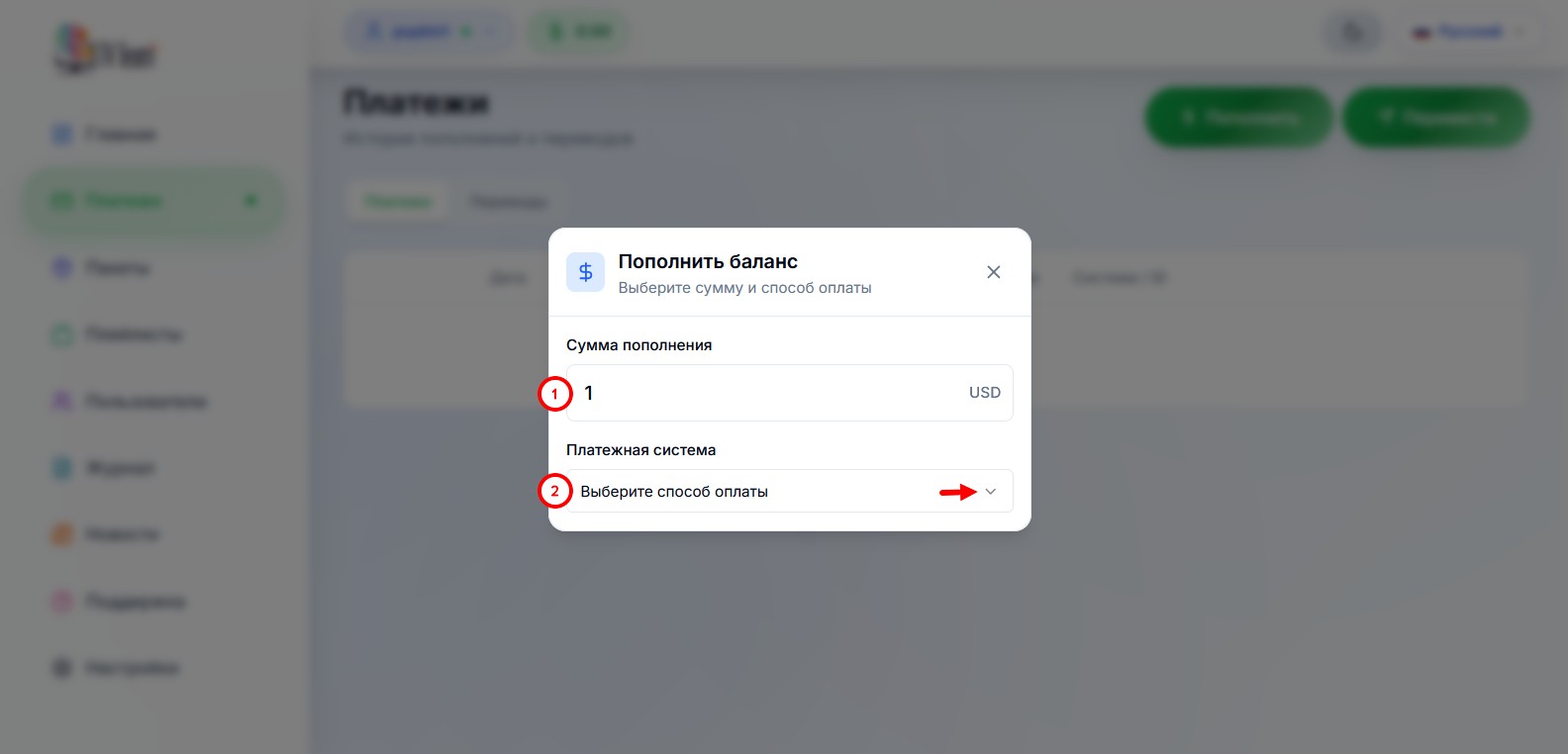
In the opened form, enter the amount (1) and open the list of payment aggregators (2)
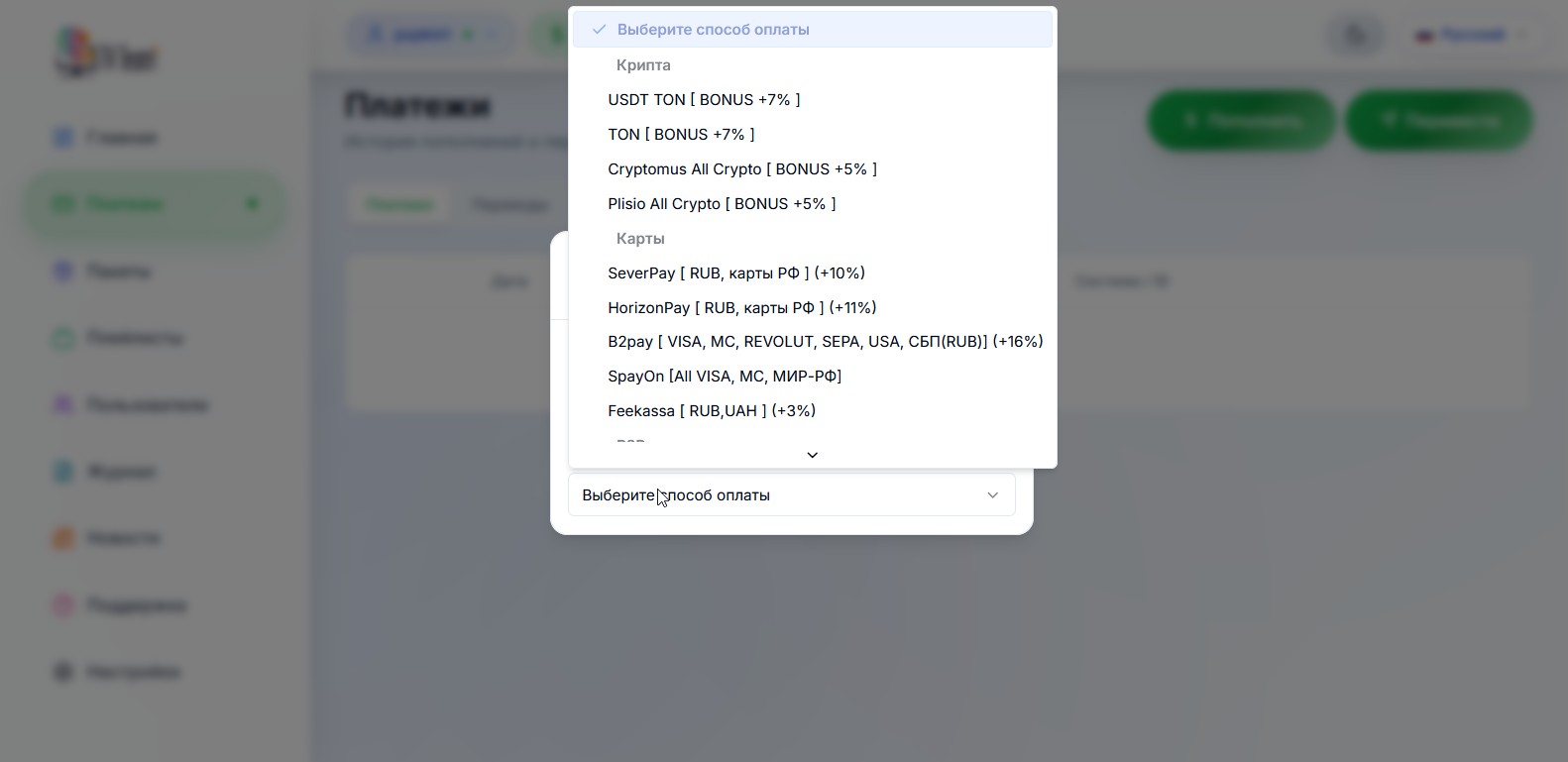
select the payment aggregator through which you want to pay (below are lists of aggregators suitable for each country).
For example, the Pally SBP aggregator was chosen.
If the amount you entered is less than the minimum possible in the selected aggregator, you will see this window:
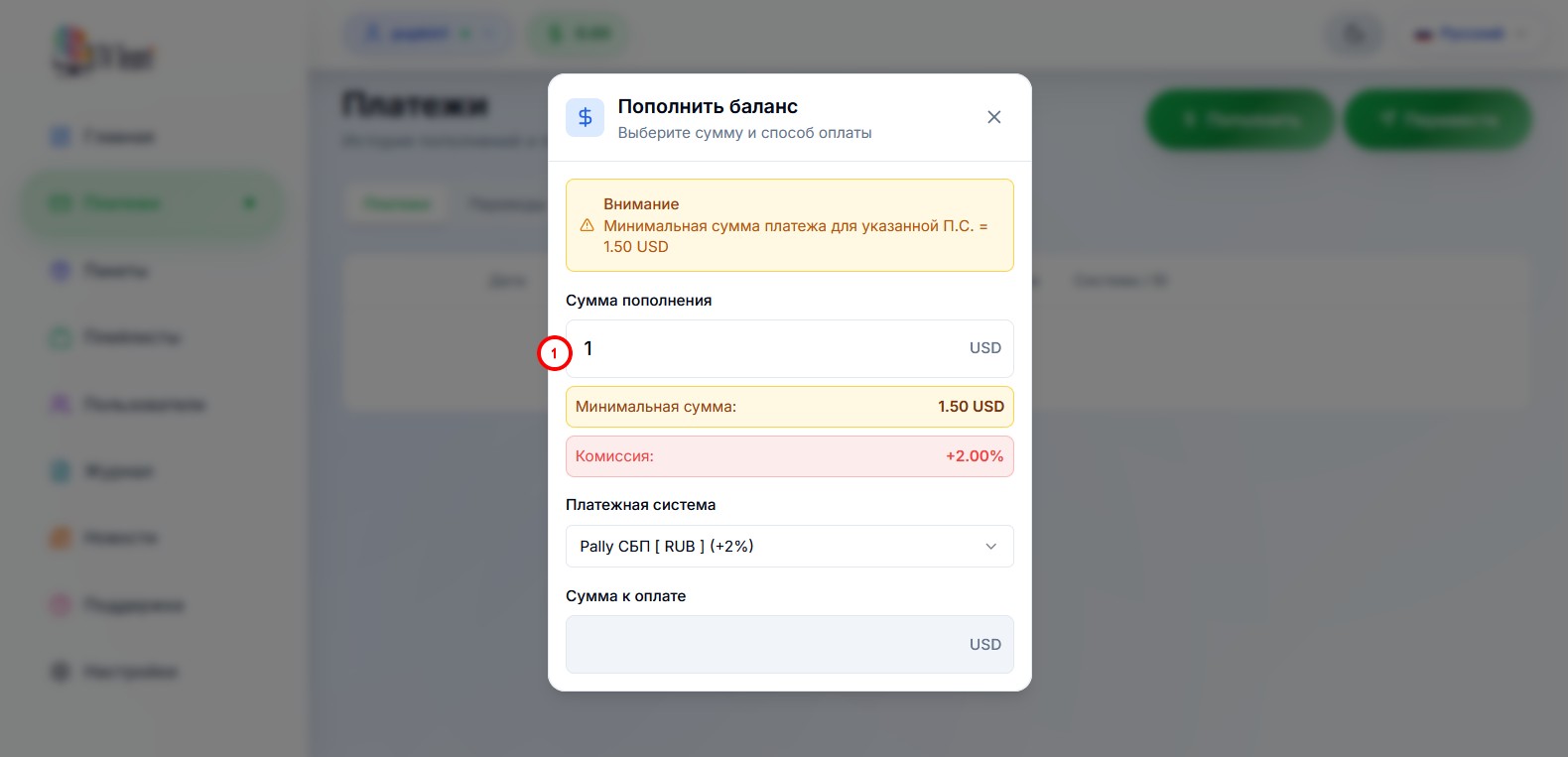
in this case, you need to increase the amount in the window (1).
If the amount is fine, this window will open:
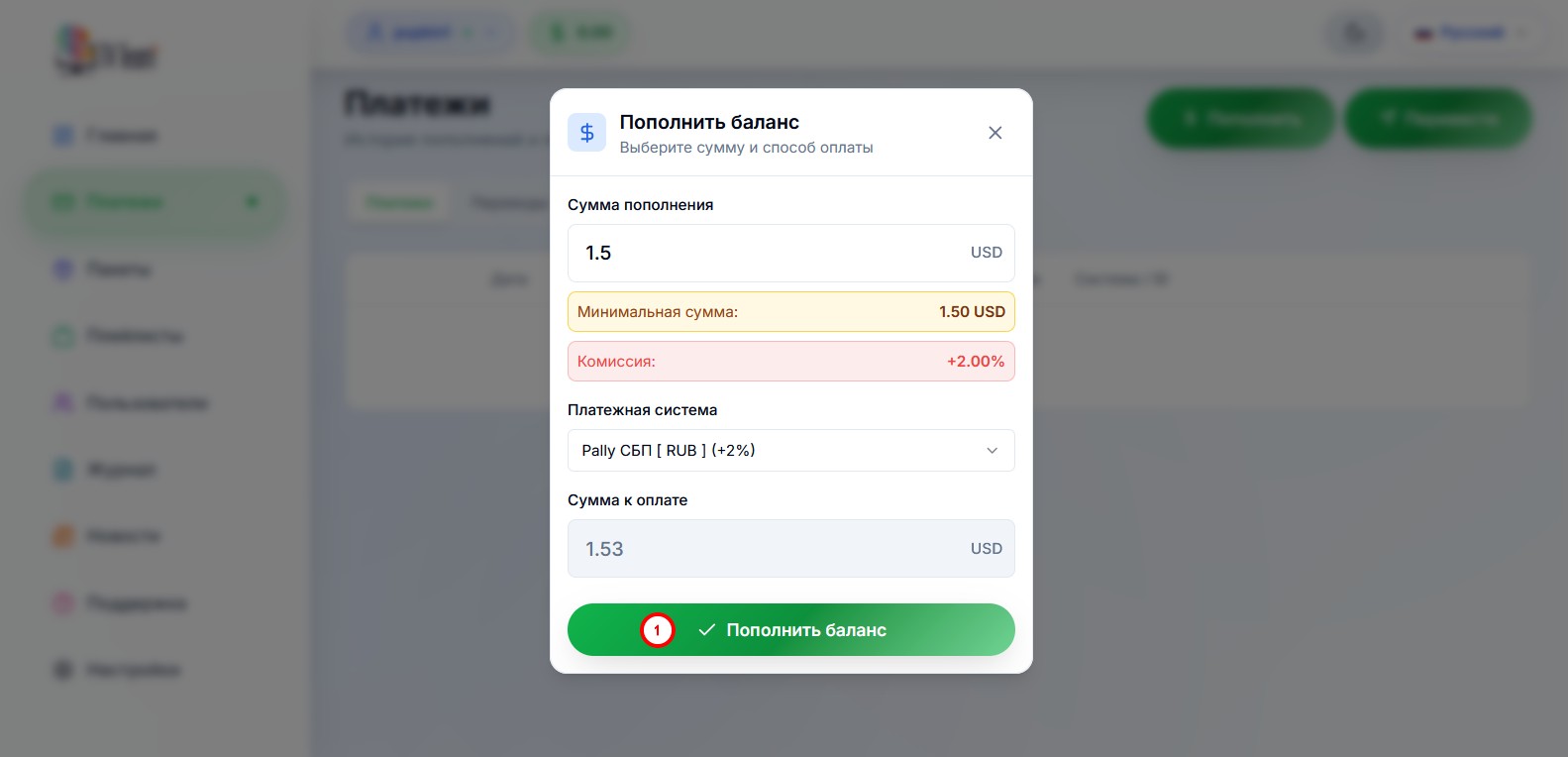
where you need to click the Top up balance button (1).
In the opened window, you need to:
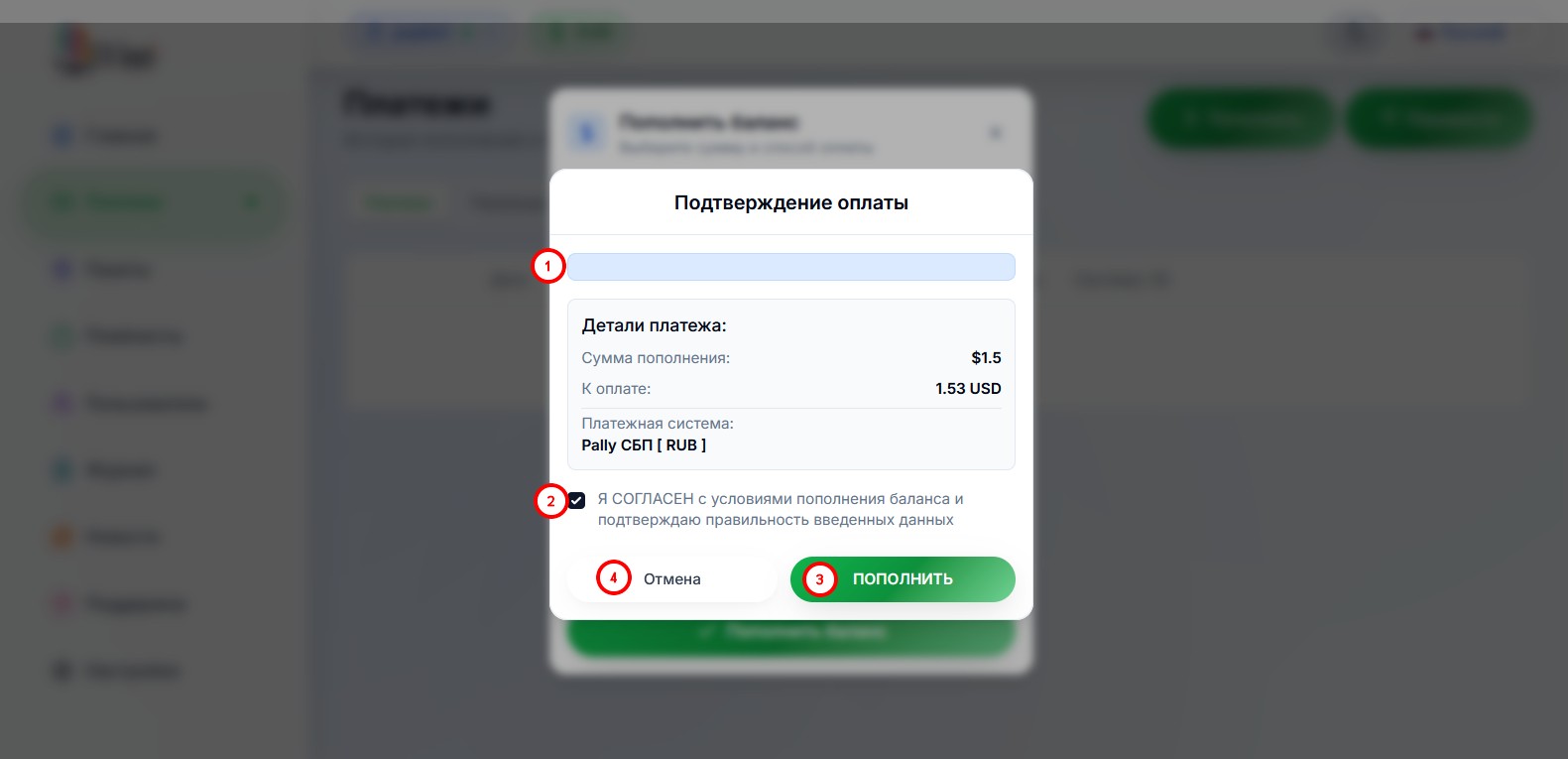
- read the balance top-up conditions;
- check the box to agree with the balance top-up conditions and verify that the entered data is correct;
- if you agree with the balance top-up conditions, click the Top up button;
- if you disagree or entered/selected something incorrectly, click the Cancel button.
If you clicked the Top up button, a payment form of the selected payment aggregator will open. Each aggregator has its own form, you need to fill in the fields of this form following the aggregator’s instructions (if any) and make the payment.
¶ Payment aggregator options for different countries:
Europe / Russia / Belarus / Ukraine / Kazakhstan / Azerbaijan
Israel, Armenia, Georgia, Uzbekistan, Moldova (and many other countries)
¶ In Europe, the following payment aggregator options are available to you:
- by card via SpayOn (VISA MC), try several times in a row and with a break, email address must be valid;
- by card via SeverPay (VISA MC Europa), try several times in a row and with a break, email address must be valid
Attention! Payments from countries listed are not accepted - Syria, Yemen, Afghanistan, Belarus, Central African Republic, Cuba, Haiti, Iraq, Crimea, Sudan, Democratic Republic of the Congo, Iran, Mali, Myanmar, South Sudan, Venezuela, Russia, Somalia, Zimbabwe, North Korea, Cuba, Ukraine, Azerbaijan, Kazakhstan, Turkey, USA, Japan; - cryptocurrency via TON or USDT TON – 5% discount for payment
via @Wallet bot;
another instruction option;
via TON keeper; - cryptocurrency via Plisio – 3% discount for payment;
- cryptocurrency via Trybit All Crypto – 3% discount for payment, wide currency choice;
- for payment via PayPal and more, send a private message to one of our partners in our chat:
@goldberg:matrix.tv.team (ask him about amounts and options);
@root24:matrix.tv.team (PayPal only for Eurozone citizens, from 50 euros), you can also write to this user in Telegram @root24 (Support);
@bambik:matrix.tv.team (for Germany: PayPal, Wunschgutschein, Amazon vouchers up to 50); - for payment by electronic gift certificate OZON, send a private message to one of our partners in our chat:
@ozon:matrix.tv.team (special manual method; OZON does not have to be in your country, you don’t need to do anything with the purchased certificate—you just need to buy an electronic certificate or obtain it by other means and provide the activation code to the partner).
¶ In Russia, the following payment aggregator options are available:
- StreamPay via P2P and SBP QR from $5;
- MIR card via Lion tech MIR;
- MIR card via SeverPay;
- SBP via 1Payment SBP (lowest commission among SBP options);
- SBP via ParityPay (one of the lowest commissions among SBP);
- SBP via Pally SBP (one of the lowest commissions among SBP);
- SBP via AuraPay (minimum payment $1);
- SBP via WATA SBP;
- via AnyPay (cards from $13 / SBP from $2);
- cryptocurrency via TON or USDT TON – 5% discount for payment
via @Wallet bot;
another instruction option;
via TON keeper; - cryptocurrency via Plisio – 3% discount for payment;
- cryptocurrency via Trybit All Crypto – 3% discount for payment, wide currency choice;
- for payment by electronic gift certificate OZON, send a private message to one of our partners in our chat:
@ozon:matrix.tv.team (special manual method; OZON does not have to be in your country, you don’t need to do anything with the purchased certificate—you just need to buy an electronic certificate or obtain it by other means and provide the activation code to the partner).
¶ In Belarus, the following payment aggregator options are available:
- via StreamPay from $5;
- cryptocurrency via TON or USDT TON – 5% discount for payment
via @Wallet bot;
another instruction option;
via TON keeper; - cryptocurrency via Plisio – 3% discount for payment;
- cryptocurrency via Trybit All Crypto – 3% discount for payment, wide currency choice;
- for payment by electronic gift certificate OZON, send a private message to one of our partners in our chat:
@ozon:matrix.tv.team (special manual method; OZON does not have to be in your country, you don’t need to do anything with the purchased certificate—you just need to buy an electronic certificate or obtain it by other means and provide the activation code to the partner); in Belarus the certificate is easy to purchase by changing the delivery address to any Russian one.
¶ In Ukraine, the following payment aggregator options are available:
- by card via AnyPay from $10 (if the payment form doesn’t open at this amount, try increasing it);
- via StreamPay from $10 (if the payment form doesn’t open at this amount, try increasing it);
- cryptocurrency via TON or USDT TON – 5% discount for payment
via @Wallet bot;
another instruction option;
via TON keeper; - cryptocurrency via Plisio – 3% discount for payment;
- cryptocurrency via Trybit All Crypto – 3% discount for payment, wide currency choice;
- for payment in hryvnias, send a private message to one of the users in our chat:
@goldberg:matrix.tv.team (ask him about amounts and options).
¶ In Kazakhstan, the following payment aggregator options are available:
- via StreamPay from $5;
- cryptocurrency via TON or USDT TON – 5% discount for payment
via @Wallet bot;
another instruction option;
via TON keeper; - cryptocurrency via Plisio – 3% discount for payment;
- cryptocurrency via Trybit All Crypto – 3% discount for payment, wide currency choice;
- for payment, send a private message to one of our partners in our chat:
@goldberg:matrix.tv.team (ask him about amounts and options); - for payment by electronic gift certificate OZON, send a private message to one of our partners in our chat:
@ozon:matrix.tv.team (special manual method; OZON does not have to be in your country, you don’t need to do anything with the purchased certificate—you just need to buy an electronic certificate or obtain it by other means and provide the activation code to the partner).
¶ In Azerbaijan, the following payment aggregator options are available:
- by card via AnyPay from $18;
- via StreamPay from $5 – may experience disruptions, method is unstable;
- cryptocurrency via TON or USDT TON – 5% discount for payment
via @Wallet bot;
another instruction option;
via TON keeper; - cryptocurrency via Plisio – 3% discount for payment;
- cryptocurrency via Trybit All Crypto – 3% discount for payment, wide currency choice;
- for payment, send a private message to one of our partners in our chat:
@goldberg:matrix.tv.team (ask him about amounts and options); - for payment by electronic gift certificate OZON, send a private message to one of our partners in our chat:
@ozon:matrix.tv.team (special manual method; OZON does not have to be in your country, you don’t need to do anything with the purchased certificate—you just need to buy an electronic certificate or obtain it by other means and provide the activation code to the partner).
Download the UniBank app from Playmarket, register and activate the Digital Card, must be MasterCard, the card is issued free and activated immediately, can be used to pay via b2pay;
Call your VTB bank and check if they issue MIR cards; if yes, you can get a physical or virtual card and pay via SeverPay;
ABB Bank issues MasterCards for free; with this card, payment goes through b2pay, the card is issued the same day without waiting.
¶ In Israel, Armenia, Georgia, Uzbekistan, Moldova (and many other countries), the following payment aggregator options are available:
- by card via SpayOn (VISA MC), try several times in a row and with a break, email address must be valid (except USA, Azerbaijan, Belarus, Ukraine, Kazakhstan, Japan);
- by card via SeverPay (VISA MC Europa), try several times in a row and with a break, email address must be valid
Attention! Payments from countries listed are not accepted - Syria, Yemen, Afghanistan, Belarus, Central African Republic, Cuba, Haiti, Iraq, Crimea, Sudan, Democratic Republic of the Congo, Iran, Mali, Myanmar, South Sudan, Venezuela, Russia, Somalia, Zimbabwe, North Korea, Cuba, Ukraine, Azerbaijan, Kazakhstan, Turkey, USA, Japan; - by card via AnyPay, only for Armenia, Uzbekistan, Kyrgyzstan and Tajikistan (AMD from $3 / UZS from $3 / KGS from $11 / TJS from $10);
- cryptocurrency via TON or USDT TON – 5% discount for payment
via @Wallet bot;
another instruction option;
via TON keeper; - cryptocurrency via Plisio – 3% discount for payment;
- cryptocurrency via Trybit All Crypto – 3% discount for payment, wide currency choice;
- for payment, send a private message to one of our partners in our chat:
@goldberg:matrix.tv.team (ask him about amounts and options); - for payment by electronic gift certificate OZON, send a private message to one of our partners in our chat:
@ozon:matrix.tv.team (special manual method; OZON does not have to be in your country, you don’t need to do anything with the purchased certificate—you just need to buy an electronic certificate or obtain it by other means and provide the activation code to the partner).
¶ Attention!
If any payment aggregator (listed in the instructions) is not visible among the offered options in your personal account, it means that this aggregator has some issues, temporary or permanent.
If temporary, it will return after some time; if permanent, we will update the instructions accordingly.